


The Flight Tracker
3.93.10K Reviews
App Specs
- Version
- 3.2.1
- Updated On
- License
- Free
- Downloads
- 5,000,000+
- Developer
- Impala Studios
- Categories
- Travel & Local
- Platform
- Android, iOS
Screenshots
 Analysis by AppCompare
I find flight-tracking apps most useful when they answer one practical question quickly: has the flight changed, and what should I do next? The Flight Tracker is built around that moment. It’s a travel app from Impala Studios for checking flight progress and staying informed about arrivals and departures, rather than a complete trip-planning service. If you’re opening one for the first time, I’d start with a single upcoming flight and use it to learn how its information is organized before relying on it during a busy airport day.
What to expect from a focused flight companion
The Flight Tracker is free to download, with optional in-app purchases ranging from under a dollar to around thirty-two dollars per item. It’s rated for Everyone, has an average rating of 4.0 from around thirty-four thousand ratings, and has been installed over five million times. Those figures suggest a well-used app, but they don’t guarantee that every screen or update will suit your routine. I’d judge it by whether it helps you check a particular journey without adding more travel admin.
The main distinction to keep in mind is its narrower purpose. Airline apps are usually the better place to handle booking-specific tasks, while a general search or airport website can be handy when you only need a quick public status check. A dedicated tracker can make sense when you want to follow a flight as a trip unfolds, especially if you’re meeting someone or coordinating a pickup. I wouldn’t replace your airline’s official information with any third-party tracker when a gate or boarding instruction needs immediate confirmation.
Getting started without overcomplicating the trip
On first opening the app, I’d avoid trying to organize every journey at once. Search for one flight you already know about, using its flight number if you have it. If you don’t, the app also supports searching by route or airport, so you can begin with the details you remember. That gives you a straightforward first test: find the right journey, check that the route and timing look sensible, and then decide whether you want to keep following it.
A small but useful habit is to check the flight details against the airline confirmation before treating a search result as yours. Routes can have similar city or airport names, and the flight number is usually the clearest way to avoid following the wrong trip. If you’re searching by airport, narrow down the result using the route and departure time rather than choosing the first match. This takes a moment, but it can prevent a notification about somebody else’s flight from confusing your plans.
The app’s current version is 3.1.0 and it requires Android 8.0 or later. The first-use experience is intended to be approachable, though, as with any travel tool, it’s worth getting familiar with the screens while you have a calm moment rather than waiting until you’re rushing through a terminal. I’d also review notification choices early so the alerts you receive are useful rather than another stream of interruptions.
Turning a search into a useful update
Once you’ve found the flight you care about, the most meaningful first success is not simply seeing it on screen; it’s knowing what information you need to act on. The app is designed to track flight status and provide arrival or departure updates. If alerts are available for the details you want, set them around your actual role in the trip. A passenger may care about a departure change, while someone collecting a traveler may care more about an updated arrival time.
Worth Reading Before You Choose

EA SPORTS FC Mobile 26 Is a Bigger Football Game, but It Takes Time

Flipboard Shows What News Apps Must Do Beyond the Feed

Switching to Android Auto Means Rethinking Your Driving Routine

Google Calendar Makes a Crowded Week Easier to Manage

Ludo King Makes the Most of the Minutes Between Plans

Baby Panda World Brings Quick Play to Modern Phones, but Its Game Library Feels Busy
For example, if I’m collecting a friend after work, I’d look up the flight before leaving and keep an eye on its progress instead of setting off based on the original schedule alone. That makes the tracker useful as a planning aid: I can avoid arriving much too early if the flight is running late, while still checking the airport’s or airline’s official channels before making a final decision. The app can help reduce guesswork, but it doesn’t remove the need to verify important changes at the source.
There’s a helpful difference between an alert and a guarantee. A notification can bring a change to your attention, but phones may be muted, offline, or busy with other notifications. For a time-sensitive departure, I’d open the app and check directly as well as relying on alerts. For a pickup, I’d treat an arrival estimate as a reason to adjust when I leave, not as a promise that the aircraft will reach the gate at that exact minute.
How it fits beside airline apps and airport information
Compared with checking a flight manually on an airline website, a tracker is most convenient when you want to return to the same journey and follow its status over time. An airline app remains the more appropriate choice for booking changes and other account-specific travel tasks. Airport information can be useful for checking what is happening at a particular terminal, but it may not give you the same flight-focused view. I’d use each source for the job it handles best instead of expecting this app to manage the whole trip.
That division is especially useful when you’re not the passenger. If you’re welcoming a relative, you may not have access to their booking, but you can still search for the flight details they share with you and follow its progress. If you are the passenger, keep your airline confirmation and boarding information somewhere easy to reach; a tracker is a companion for status, not a substitute for the documents and instructions attached to your booking.
It also helps to decide what you want the app to do before adding anything else to your routine. If your only question is whether a flight has landed, a quick search may be enough. If you’re coordinating several people or planning a pickup, keeping the relevant flight easy to find can save repeated searching. I’d avoid building a complicated workflow around a single trip unless you genuinely need it; fewer, clearly identified flights are easier to check under pressure.
First Impressions
Right off the bat, The Flight Tracker has a clean and intuitive interface. When you first open the app, you’re greeted with a user-friendly layout that makes it super easy to find what you're looking for. The minimalist design doesn’t overwhelm you with too much information at once, which is a huge plus.
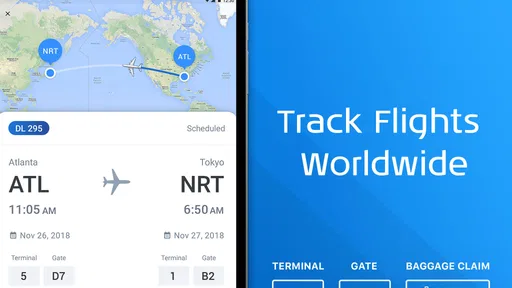
The app allows you to search for flights by route, flight number, or even airport. This flexibility is great because, let’s face it, sometimes we forget the flight number and just remember the departure and arrival cities. Once you enter the details, the app pulls up all the relevant information faster than you can say “boarding pass.”
Features That Stand Out
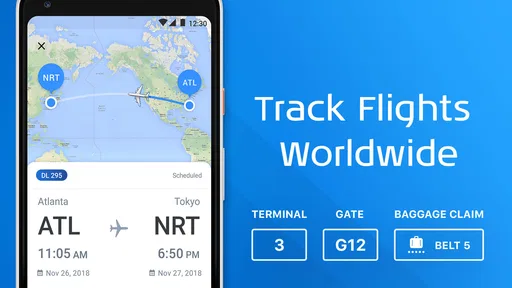
Now, let’s dive into some of the features that really set this app apart. One of the standout features is the real-time flight tracking. You can literally watch your flight move across the map, complete with updates on delays, gate changes, and baggage claim details. It’s like having a personal flight radar!
Another cool feature is the ability to set up notifications. You can customize these alerts to suit your needs—whether it’s a reminder for your flight’s departure or a heads-up about a delay. This can save you a lot of stress and keep you one step ahead.
For those of us who like to keep everything organized, the itinerary feature is a dream come true. You can store all your flight details in one place, and even sync it with your calendar. This way, you have all your travel plans laid out neatly, and you can focus on enjoying your trip rather than worrying about the logistics.
Performance and Reliability
When it comes to performance, The Flight Tracker doesn’t disappoint. The app runs smoothly without any noticeable lag, and the information is updated in real-time. I’ve used it in various locations, and it’s consistently reliable, which is crucial when you’re dealing with something as time-sensitive as flight information.
The app also offers offline access to your saved flights. So, even if you’re in a network dead zone or flying over the ocean, you can still access your itinerary and flight details without a hitch. This feature is a lifesaver, especially during those long-haul flights.
Room for Improvement
Of course, no app is perfect. While The Flight Tracker does a fantastic job, there are a few areas where it could improve. For example, the app could benefit from a more robust integration with other travel services like hotel bookings or car rentals. This would make it a one-stop shop for all travel needs.
Additionally, while the app is generally easy to use, some users might appreciate a quick tutorial or walkthrough when they first install it. This could help new users get up to speed with all the features available.
Choosing when this app is the right tool
I’d recommend it most to people who travel often, coordinate airport pickups, or want one place to revisit flight information. It can also suit an occasional traveler who prefers checking a journey in advance instead of searching for it repeatedly. The learning curve is modest: start with one flight, confirm that it’s the one you intend to follow, and then try the options that fit your plans.
On the other hand, I wouldn’t install it expecting a complete travel organizer. Someone who mainly needs tickets, check-in, seat selection, or booking support should turn to the airline app for those tasks. A traveler who never needs updates beyond a single arrival check may find a browser search sufficient. And if you’re not comfortable depending on a phone for time-sensitive information, keep using airport displays and official airline communications as your final reference.
One practical trade-off is that a focused tracker can make flight status easier to revisit, but it cannot control how quickly an airline or airport communicates a change. I’d use it to notice developments, then confirm consequential details through an official channel. That approach is particularly sensible for gate changes: an alert is a prompt to check, not a reason to walk to a different part of the terminal without verifying the latest instruction.
A calmer routine for departure day
For a first trip, I’d set up the flight at home or during another quiet moment, not while standing in a queue. Save or keep the itinerary easy to access, choose only the notifications that matter to you, and check the status again before leaving for the airport. At the terminal, use the airline’s current boarding information for decisions about where to go. This simple division gives the tracker a useful role without asking it to replace every source of travel information.
If you’re meeting someone, agree beforehand on the flight they’re taking and use the flight number where possible. That avoids a common source of confusion: searching for a route that has several possible services and then following the wrong one. If plans change and the passenger takes a different flight, update your search rather than assuming the original journey still applies. It’s a small check, but it matters when your ride, work schedule, or connection depends on the right arrival.
People often wonder whether they need to keep the app open to benefit from it. The practical answer is to use it for checks and set up any alerts you want, while remembering that an alert should not be your only source for a critical update. If you are already in the air or have poor connectivity, saved information can still be useful for reference, but current status may require a connection. I’d check what is visible on your device before travel so you know what you can access offline.
Another sensible question is whether to use it alongside a calendar. If having a flight in your calendar helps you plan work or transport, that can be worthwhile; just avoid treating a calendar entry as live status. A scheduled time is a planning anchor, whereas flight progress can change. Keeping those two roles separate makes the app’s updates more useful and reduces the chance of relying on an old reminder.
Final Thoughts
All in all, The Flight Tracker is a fantastic tool for anyone who travels frequently or just wants to keep tabs on flights. Its real-time tracking, customizable alerts, and seamless performance make it an essential app for travelers. While there’s always room for growth, it already offers a comprehensive solution to flight tracking challenges.
If you’re tired of juggling multiple apps to keep track of your flights, give The Flight Tracker a shot. Trust me, it’ll make your travel experience smoother and more enjoyable. So, next time you’re planning a trip, don’t forget to download this handy companion. Safe travels!
Pros
- Real-time flight updates enhance user experience.
- User-friendly interface simplifies navigation.
- Customizable alerts for flight status changes.
- Supports multiple airlines and airports globally.
- Offline access to itinerary for convenience.
Cons
- Some features require a premium subscription.
- Occasional delays in flight update notifications.
- Ads can be intrusive in the free version.
- Limited customization options for themes.
- Battery consumption can be high with constant use.
FAQs for The Flight Tracker
What features does The Flight Tracker offer for real-time flight information?
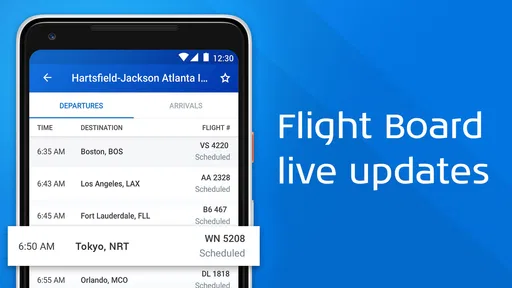
The Flight Tracker provides comprehensive real-time flight information, including live updates on departure and arrival times, gate assignments, and delays. Users can track flights worldwide, view detailed flight maps, and receive push notifications for any changes. The app also offers airport information and weather updates for a seamless travel experience.
Is The Flight Tracker app free to use, or does it have in-app purchases?
The Flight Tracker app is available as a free download, but it offers in-app purchases for additional features. These may include an ad-free experience, advanced tracking capabilities, and premium alerts. Users can choose to upgrade to enhance their experience and access more detailed flight insights.
How reliable is the flight data provided by The Flight Tracker?
The Flight Tracker sources its data from multiple reliable aviation data providers to ensure accuracy. It gives real-time updates and is known for its reliable and timely information. However, users should always verify critical travel information directly with airlines, as last-minute changes can occur.
Can I track multiple flights at the same time using The Flight Tracker?
Yes, The Flight Tracker allows users to monitor multiple flights simultaneously. You can save flights to your personalized list to easily access their status and receive updates. This feature is particularly useful for frequent travelers or those managing travel for others, such as family or colleagues.
Does The Flight Tracker work offline, and what features are accessible without internet?
While The Flight Tracker requires an internet connection for real-time updates and notifications, certain features like saved flight data and itineraries can be accessed offline. This is useful during flights or in areas with limited connectivity, allowing users to review their travel plans without needing a connection.


